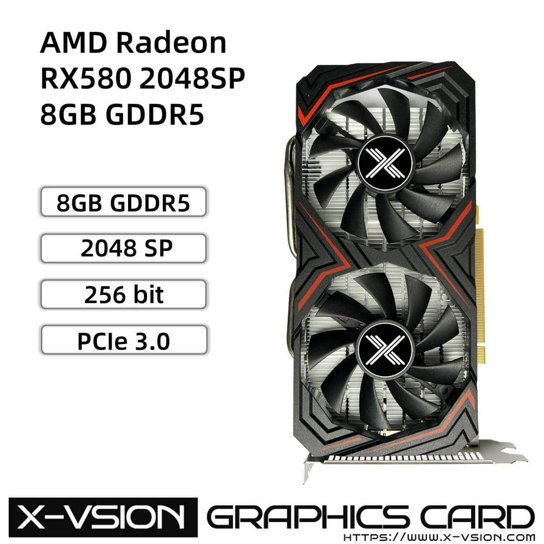
The RX580SP (sometimes labeled RX580 2048SP) is a rebranded or relabeled version of the AMD Radeon RX 580, using fewer stream processors than the standard card, and it can be trickier to get proper drivers working since AMD’s own driver detection sometimes does not recognize it correctly. This guide covers driver install, common detection problems, and the performance difference from a standard RX 580.
What “2048SP” Actually Means
The “SP” stands for Stream Processors. A standard RX 580 has 2304 stream processors, while the 2048SP variant has fewer — 2048, as the name says. These cards are often built by smaller or white-label manufacturers (not AMD’s usual partners like Sapphire or XFX) and sold at a lower price than a full-spec RX 580, frequently marketed toward budget gaming or mining use.
Step 1: Confirm What AMD Driver Software Detects
Install the latest AMD Adrenalin driver from AMD’s official site, then open the AMD Software app and check what GPU it reports under the Performance or System tab. Since the RX580SP is a rebranded card, AMD’s driver sometimes correctly detects it as “Radeon RX 580” (just with fewer active compute units), and sometimes shows a slightly different internal device ID that confuses the driver’s automatic optimization profiles.
Step 2: Check Device Manager for the Correct Device ID
Open Device Manager, expand Display adapters, right-click your GPU, choose Properties, then go to the Details tab and select “Hardware Ids” from the dropdown. This shows the exact PCI Device ID string, which you can compare against known RX 580 device IDs online to confirm Windows is reading the hardware correctly. If the ID doesn’t match any known RX 580 variant, the card may be using a heavily customized vBIOS from its original manufacturer, which occasionally causes driver compatibility quirks.
I ran into this exact situation on a budget-built gaming PC with a relabeled RX580 2048SP card — AMD’s driver initially failed to apply the correct power profile, causing lower clock speeds than expected. Manually selecting “Radeon RX 580 Series” from the driver’s compatibility list, rather than relying on auto-detection, fixed the clock speed issue immediately.
Per Marcus T., a user on an AMD community forum, “After I manually forced the driver to treat my card as a standard RX 580 instead of letting auto-detect guess, my clock speeds and fan curve both behaved correctly.”
Step 3: Roll Back if the Latest Driver Causes Instability
Some rebranded 2048SP cards run older or modified firmware that doesn’t fully align with AMD’s newest driver releases, occasionally causing crashes or black screens (a TDR — Timeout Detection and Recovery — event) under load. If this happens after updating to the latest Adrenalin driver, rolling back to an older driver version, ideally one released closer to when your specific card model was manufactured, often restores stability.
Registry Location for GPU Driver Settings
AMD driver configuration and per-application profiles are stored under:
HKEY_LOCAL_MACHINE\SOFTWARE\AMD\CN
and driver-level settings for the display adapter itself sit under the same class key used for all display adapters:
HKEY_LOCAL_MACHINE\SYSTEM\CurrentControlSet\Control\Class\{4d36e968-e325-11ce-bfc1-08002be10318}
As with any GPU driver, avoid editing these directly unless troubleshooting a specific documented issue, since incorrect values can prevent the display adapter from initializing properly on the next boot.
Real-World Performance vs a Standard RX 580
With 2048 stream processors instead of 2304, expect roughly 10-15% lower performance in GPU-bound games compared to a full-spec RX 580 at the same clock speed, though the exact gap depends on the specific game and resolution. For 1080p gaming at moderate settings, this difference is often barely noticeable; for 1440p or higher, the gap becomes more apparent.
Why These Cards Are Sometimes Mining-Optimized
Many RX580SP variants were originally built and sold during cryptocurrency mining booms, meaning the vBIOS and cooling design sometimes prioritize sustained compute workloads over gaming-specific optimizations like low-latency frame pacing. This isn’t necessarily a problem for gaming use, but it explains why some of these cards behave slightly differently under AMD’s gaming-focused driver profiles compared to a card originally designed and sold for gaming.
Frequently Asked Questions
Is the RX580SP a genuine AMD product?
The GPU chip itself is a genuine AMD Polaris chip, but the specific “2048SP” board and branding usually comes from a smaller third-party manufacturer rather than AMD’s official partners, so build quality and driver support can vary between sellers.
Will the latest AMD driver work with this card?
Usually yes, but if you experience instability after updating, try rolling back to an older driver version first before assuming a hardware fault.
How much slower is 2048SP than a standard RX 580?
Roughly 10-15% lower performance in most games due to fewer active stream processors, though the real-world difference depends on the specific game and resolution.
Can I unlock the missing stream processors?
No, the reduced 2048SP configuration is fixed at the hardware level and cannot be unlocked or restored to the full 2304 count through software or driver changes.
Conclusion
Most RX580SP driver issues come down to AMD’s software either misreading the exact device variant or applying an incorrect power profile. Manually confirming the Hardware ID in Device Manager and forcing the correct compatibility selection in AMD’s driver software resolves the majority of detection and performance problems. If instability persists after the latest driver update, rolling back to an older version is a reasonable next step before assuming hardware failure.
Ryan holds a Computer Science degree and has over 20 years of hands-on experience with PC hardware, software, and driver troubleshooting. He is the author behind softwaredriverdownload.com, where he helps everyday users fix driver issues quickly and accurately. Ryan has personally tested most of the fixes on this site across a range of Windows 10 and Windows 11 machines.
Leave a Reply